Using the Lite-On LTP-305 LED Matrix Display: Pinout, Circuit, and Arduino Guide
The Lite-On LTP-305 is a compact 5×7 LED dot matrix display used in small text indicators, retro display projects, embedded panels, counters, and low-resolution visual status displays. Unlike a ready-made smart display module, the LTP-305 does not include an internal controller. To use it properly, you need to understand its row-column structure, current-limiting requirements, multiplex scanning method, and driver circuit options.
This guide explains how to use the Lite-On LTP-305 LED matrix display in a practical circuit, how to read its pinout, how to drive it with an Arduino or other microcontroller, and what to check when replacing the part because many LTP-305 variants are now obsolete or difficult to source. If you are building a prototype, repairing legacy equipment, or sourcing old display parts, this article will help you avoid the most common mistakes.
The Lite-On LTP-305 is a passive 5×7 LED dot matrix display. To use it, connect its row and column pins to a microcontroller, shift register, transistor array, or LED matrix driver, add proper current-limiting resistors, and refresh the display by multiplex scanning the rows or columns fast enough that the human eye sees a stable character.
What Is the Lite-On LTP-305 LED Matrix Display?
The Lite-On LTP-305 series is a small 5×7 LED dot matrix display. A 5×7 matrix means the display has five columns and seven rows, giving 35 LED dots that can form letters, numbers, icons, symbols, and simple animations. It is not the same as a seven-segment display. A seven-segment display is mainly for numbers, while a 5×7 dot matrix can show basic alphanumeric characters.
In practical terms, the LTP-305 is best understood as a raw LED matrix rather than a complete display module. It has no memory, no character generator, no I2C interface, and no SPI interface by itself. Your circuit or firmware must decide which dots turn on at each moment. For embedded engineers, this gives flexibility. For beginners, it can be confusing because the display will not show anything unless the row-column scanning logic is correct.
The LTP-305G version is commonly associated with a green 0.3 inch matrix display. Other versions, such as LTP-305HR, are red or high-efficiency red variants. Before wiring or replacing any LTP-305 part, always check the exact datasheet for the suffix you have, because color, forward voltage, luminous intensity, and internal pin connections may differ.
Lite-On LTP-305 Series Overview
The LTP-305 family is useful in compact applications where a full LCD or OLED is unnecessary. It is often seen in older electronic equipment, DIY clocks, retrocomputing projects, small instrument panels, and educational electronics. As part of the wider optoelectronics category, it converts electrical drive signals into visible light, but it requires external logic to make meaningful characters.
| Part / Variant | Typical Display Type | Color | Notes |
|---|---|---|---|
| LTP-305G | 5×7 dot matrix | Green | Commonly listed as 0.3 inch green matrix, anode column / cathode row |
| LTP-305HR | 5×7 dot matrix | High-efficiency red | Useful for red retro displays and low-power visual indicators |
| LTP-305R / similar legacy variants | 5×7 dot matrix | Red or related color versions | Confirm pinout, package, and optical data before substitution |
LTP-305G is an obsolete part in major distributor listings. For repair work, remaining stock may still exist, but for new designs you should evaluate modern 5×7 LED matrix alternatives or a display module with an integrated driver.
Key Specifications to Check Before Using LTP-305
Before you connect the display to an Arduino, ESP32, STM32, or any other controller, check the electrical and mechanical details. A raw LED matrix can be damaged if it is connected without current limiting, or it may appear faulty if the row and column polarity is misunderstood.
| Specification | Why It Matters | Design Note |
|---|---|---|
| Matrix format | Defines firmware bitmap size | LTP-305 is a 5×7 dot matrix, so each character is usually stored as 5 columns or 7 rows of bitmap data. |
| Internal connection | Controls drive polarity | LTP-305G is commonly documented as anode column and cathode row. Verify your exact part. |
| Forward voltage | Used for resistor calculation | Green versions are often around 2.1V typical, but use the datasheet value for your variant. |
| Peak and average current | Affects brightness and lifetime | Multiplexed displays use pulsed current. Do not exceed absolute maximum ratings. |
| Package size | Affects drop-in replacement | 0.3 inch matrix height does not mean all alternatives share the same PCB footprint. |
| Lifecycle status | Important for production | For new designs, avoid depending on obsolete stock unless you have a secure supply plan. |
LTP-305 Pinout Explained
The LTP-305 pinout can look confusing because the display does not expose 35 separate LED pins. Instead, the LED dots share row and column connections. This is what makes multiplexing possible. You select one side of the matrix, set the other side according to the pattern you want, wait briefly, then move to the next row or column.
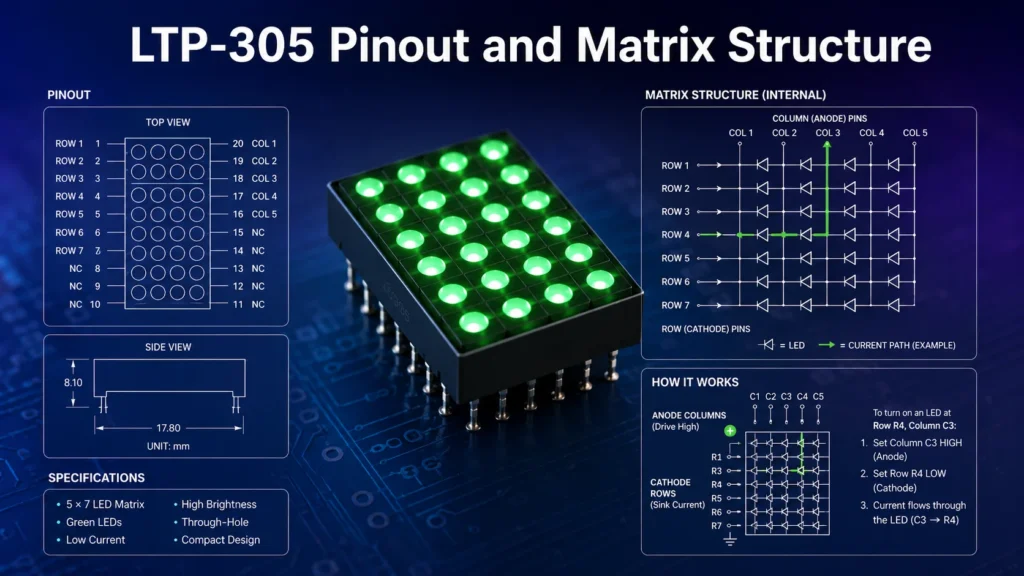
For the LTP-305G, the datasheet describes an anode-column and cathode-row structure. In a simplified explanation, a selected column is driven positive, and selected row lines are pulled low to complete the LED current path. If your firmware assumes the opposite polarity, the display may not light, may show inverted patterns, or may light unintended dots.
Do not start by assigning Arduino pins randomly. First identify which display pins are column anodes and which pins are row cathodes. Then decide whether your firmware will scan by column or by row.
Suggested Pin Mapping Worksheet
Because legacy matrix displays may have suffix differences, it is safer to build your own pin mapping table from the datasheet. Use a worksheet like this before writing code:
| Display Function | Datasheet Pin | MCU / Driver Pin | Drive Behavior |
|---|---|---|---|
| Column 1 Anode | Check datasheet | D2 or driver output | Driven HIGH during active column scan |
| Column 2 Anode | Check datasheet | D3 or driver output | Driven HIGH during active column scan |
| Row 1 Cathode | Check datasheet | D8 or sink driver | Pulled LOW when the dot should light |
| Row 2 Cathode | Check datasheet | D9 or sink driver | Pulled LOW when the dot should light |
How the LTP-305 LED Matrix Works
The LTP-305 works by row-column selection. A single LED dot lights only when its column and row create a valid current path. If you want to display a character such as “A”, your firmware does not turn on the entire character all at once. Instead, it rapidly scans the display one column or row at a time.
For example, in column scanning, the controller activates column 1, sets the row lines for the pixels needed in that column, waits for a short time, turns column 1 off, activates column 2, sets the next row pattern, and continues through all five columns. If the refresh rate is fast enough, persistence of vision makes the character appear stable.
Direct GPIO Drive
Good for learning and one-display prototypes. It uses many microcontroller pins and must respect GPIO current limits.
Shift Register Drive
Useful when you want to reduce GPIO usage. A 74HC595 shift register can handle logic expansion, but current capability must be checked carefully.
Matrix Driver IC
Best for cleaner designs, multiple displays, brightness control, and production hardware. A dedicated LED driver reduces firmware and wiring complexity.
Basic Circuit for Using LTP-305 with a Microcontroller
The simplest LTP-305 circuit uses a microcontroller, current-limiting resistors, and the display itself. For a low-current experiment, you can connect the row and column lines directly to GPIO pins, but this is not always ideal. When multiple LEDs are on during a scan step, the common row or column pin may carry more current than a single LED. This is where transistor drivers or driver ICs become important.
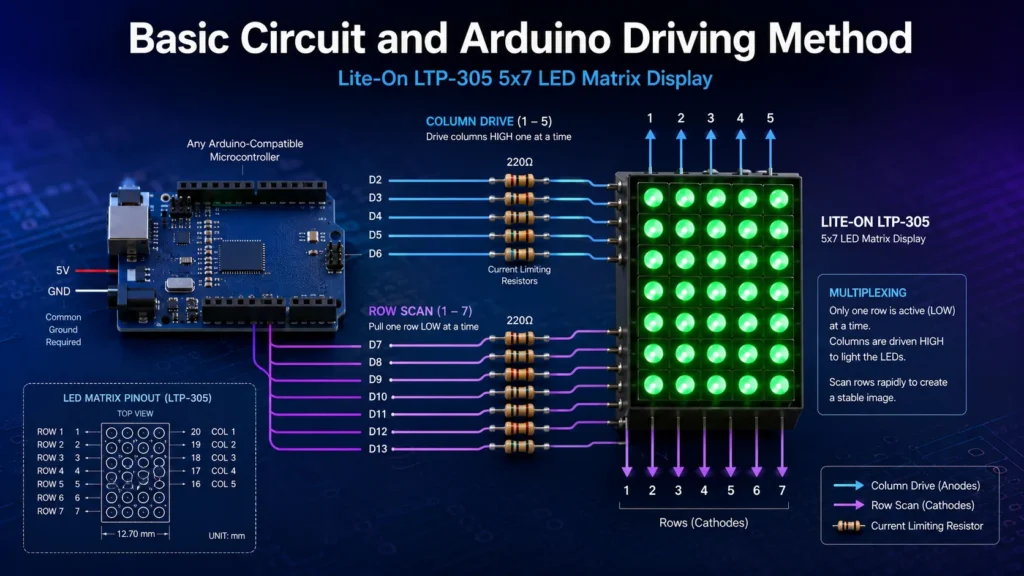
If you are using an Arduino-style board, the basic idea is to connect the column pins to output pins that can source current and the row pins to output pins that can sink current. In practice, many designs add resistors on the row or column side. The exact resistor placement depends on your scan method and driver topology. For production, avoid relying on raw MCU pins if the display must be bright or continuously active.
Do You Need Current-Limiting Resistors?
Yes. Each LED current path needs current limiting unless a regulated LED driver is used. A common beginner mistake is connecting the display directly to 5V and GPIO pins without resistors. This can overcurrent the LED dots, damage the microcontroller, or shorten display life.
Use the basic resistor formula:
R = (VCC – Vf) / If
For example, with a 5V supply, a green LED forward voltage around 2.1V, and a target current of 10mA: R = (5V – 2.1V) / 0.01A = 290Ω. A 300Ω or 330Ω resistor is a reasonable starting point for low-current testing.
If you are not sure how to identify resistor values, use a resistor guide or calculator before testing the circuit. For related component basics, MOZ Electronics also provides practical electronics tutorials in the tutorials section.
Do You Need Transistors?
For a single low-brightness display, direct GPIO drive may work for a bench demo. For a brighter display, multiple LTP-305 units, or reliable continuous operation, use transistor stages or a driver IC. A small NPN transistor such as a 2N3904 can be used as a low-side switch in many LED drive circuits; see the 2N3904 NPN transistor guide for practical switching concepts.
Another useful option is a Darlington transistor array such as ULN2003. Although ULN2003 is often discussed for relays and stepper motors, its low-side switching concept is also relevant to LED matrix row sinking when the current and voltage ratings match the design. For more driver background, read the Arduino ULN2003 driver board guide.
Arduino Example: Displaying a Character on LTP-305
The LTP-305 can be driven by Arduino, ESP32, STM32, MSP430, or many other controllers. The important part is not the exact board but the scanning logic. For modern low-power IoT boards, voltage level and current limits matter. If you are working with ESP32-based projects, review your board’s GPIO behavior first; the ESP32-C3 Super Mini pinout guide is a useful example of why pin selection matters.
Character Bitmap Concept
A 5×7 character is usually stored as a bitmap. The letter “A” can be represented like this:
01110
10001
10001
11111
10001
10001
10001
Each “1” means the dot should be lit, and each “0” means it should remain off. Depending on whether your code scans by row or column, you may store the bitmap row-first or column-first. If the character appears mirrored, rotated, or upside down, your row order or column order is probably reversed.
Example Code Structure
The exact Arduino pins must match your datasheet mapping, but the code structure usually looks like this:
const int columnPins[5] = {2, 3, 4, 5, 6};
const int rowPins[7] = {8, 9, 10, 11, 12, 13, A0};

byte letterA[5] = {
  B0111110,
  B1001000,
  B1001000,
  B1001000,
  B0111110
};

void setup() {
  for (int i = 0; i < 5; i++) pinMode(columnPins[i], OUTPUT);
  for (int i = 0; i < 7; i++) pinMode(rowPins[i], OUTPUT);
}

void scanDisplay() {
  for (int col = 0; col < 5; col++) {
    digitalWrite(columnPins[col], HIGH);

    for (int row = 0; row < 7; row++) {
      bool pixelOn = bitRead(letterA[col], row);
      digitalWrite(rowPins[row], pixelOn ? LOW : HIGH);
    }

    delayMicroseconds(1000);
    digitalWrite(columnPins[col], LOW);
  }
}

void loop() {
  scanDisplay();
}This is a conceptual example. You must adapt the pin arrays, row polarity, column polarity, bitmap direction, and current-limiting circuit to your actual LTP-305 variant.
Common Problems When Using LTP-305
Most LTP-305 problems come from polarity, pin mapping, or refresh timing. The display itself may be fine, but the circuit may be scanning the wrong side of the matrix or driving the pins in the wrong state.
| Problem | Likely Cause | Fix |
|---|---|---|
| Nothing lights up | Wrong polarity, no current path, incorrect pinout | Confirm anode columns and cathode rows with the datasheet. Test one dot with a resistor. |
| Only one row or column works | Scanning logic missing or one common line stuck | Check firmware loop, wiring continuity, and driver output states. |
| Display is too dim | Low duty cycle, excessive resistor value, weak GPIO drive | Improve refresh timing, verify current, or use a driver IC. |
| Display flickers | Refresh rate too low or blocking code delays scanning | Remove long delays and scan continuously at a higher refresh rate. |
| Character is mirrored | Row or column order reversed | Reverse the pin array or bitmap orientation in software. |
| MCU resets or overheats | Too much current from GPIO pins | Add transistor drivers, reduce current, or use a matrix driver IC. |
Using Driver ICs with LTP-305
A driver IC is recommended when you need stable brightness, fewer microcontroller pins, or multiple displays. Direct GPIO control is educational, but it does not scale well. A 5×7 matrix already needs many lines, and two or more displays can quickly consume most of your controller pins.
A 74HC595 can reduce GPIO usage by serially shifting output data. However, it is not a high-current LED driver by itself, so you should check output current limits and use proper resistors or transistor stages. For stronger designs, use LED matrix drivers that provide multiplexing, current regulation, or brightness control.
Good for Learning
Arduino direct GPIO drive with resistors is acceptable for a single display, low brightness, and short bench testing.
Better for Production
Use a driver IC, transistor array, or current-controlled LED matrix driver for reliability, brightness consistency, and reduced firmware overhead.
LTP-305 Applications
The LTP-305 is attractive because it is small, simple, and visually distinctive. It works well in projects where a tiny text display is enough and where the designer wants direct control over the pixels.
| Application | Why LTP-305 Works Well |
|---|---|
| Retro clocks | The 5×7 matrix gives a classic LED display appearance. |
| Small status panels | It can show letters, digits, icons, and error codes. |
| Embedded test fixtures | A small display can show pass/fail states or diagnostic codes. |
| Audio indicators | The matrix can be animated as a bar graph or VU-style indicator. |
| Educational electronics | It teaches multiplexing, bitmap fonts, current limiting, and GPIO control. |
LTP-305 Is Obsolete: Replacement and Sourcing Guide
One of the most important design notes is that the LTP-305G is obsolete in major distributor listings. That does not mean it is impossible to buy, but it does mean you should not treat it like a current-production commodity part. If you are repairing legacy equipment, you may need original surplus stock. If you are designing a new product, you should consider modern alternatives before locking the PCB footprint.
For obsolete or hard-to-find parts, MOZ Electronics can support sourcing across electronic components, legacy inventory, and replacement options. When requesting a quote, provide the exact part number, color, quantity, acceptable alternatives, package constraints, date code requirements, and whether a drop-in replacement is required.
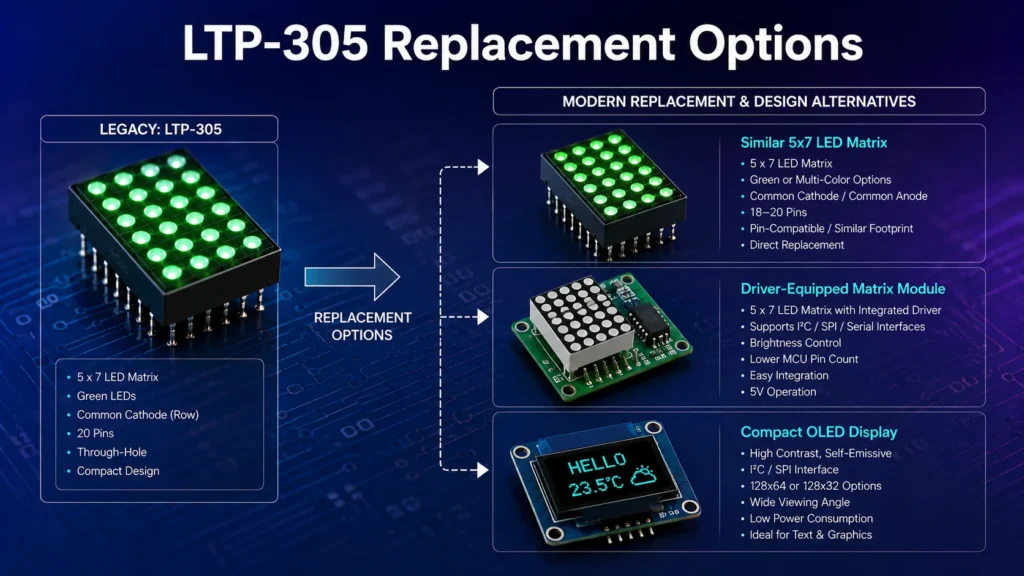
Possible Replacement Directions
| Replacement Direction | When to Use It | What to Check |
|---|---|---|
| Original LTP-305G / LTP-305HR surplus | Repair, restoration, or exact legacy replacement | Authenticity, condition, date code, lead condition, and storage history |
| Similar 0.3 inch 5×7 LED matrix | PCB-compatible replacement attempt | Pinout, anode/cathode structure, dimensions, color, brightness, and Vf |
| Larger Lite-On 5×7 matrix variants | When physical size can change | Not usually drop-in. Confirm package size and PCB redesign needs. |
| Modern LED matrix module | New designs or prototypes | Interface type, driver IC, supply voltage, brightness control, and firmware support |
| OLED or LCD module | When more characters or graphics are needed | Power, viewing angle, lifetime, interface, and environmental requirements |
A replacement is only safe if the matrix format, pinout, common anode/cathode structure, optical color, forward voltage, package dimensions, and current rating match your design requirements. A visually similar 5×7 LED matrix may still require PCB or firmware changes.
Procurement Tips for LTP-305 and Similar LED Matrix Displays
When buying obsolete LED matrix displays, do not evaluate only the part number. Ask whether the seller can confirm real stock, part marking, packaging condition, quantity, and traceability. For production or repair programs, request photos of the actual goods and confirm whether mixed lots are acceptable. This is especially important for older optoelectronic displays because brightness bin, color tone, and package condition can vary between lots.
If the application is safety-critical, industrial, or customer-facing, avoid unknown substitutes without electrical and optical validation. For industrial panels and embedded displays, the display may be only one small component, but failure can make the entire product difficult to operate. If your project also involves sensors, relays, power devices, or control boards, review related categories such as industrial automation components and discrete semiconductors when planning the full BOM.
FAQ About Using Lite-On LTP-305 LED Matrix Displays
What is the Lite-On LTP-305 used for?
The Lite-On LTP-305 is used for compact alphanumeric displays, small indicators, counters, clocks, embedded status panels, and retro-style LED matrix projects.
Is LTP-305 a seven-segment display?
No. The LTP-305 is a 5×7 LED dot matrix display, not a seven-segment display. It can show letters, numbers, symbols, and simple animations by controlling individual LED dots.
Does the LTP-305 have a built-in driver?
No. The LTP-305 is a passive LED matrix. It requires a microcontroller, shift register, transistor driver, or dedicated LED matrix driver to control the rows and columns.
Can I connect LTP-305 directly to Arduino?
Yes, for simple experiments, but you should use current-limiting resistors and respect Arduino GPIO current limits. For brighter or multi-display designs, a driver circuit is recommended.
Why is my LTP-305 display flickering?
Flicker usually happens when the multiplex refresh rate is too low, the code uses long blocking delays, or the scan routine is not running continuously.
Is LTP-305G common anode or common cathode?
LTP-305G is commonly documented as anode columns and cathode rows. Always confirm the exact internal circuit diagram from the datasheet for your part number.
What resistor should I use with LTP-305?
The resistor depends on supply voltage, LED forward voltage, and target current. For a 5V supply and a green LED with about 2.1V forward voltage, a 300Ω to 330Ω resistor is a common low-current starting point.
Is the Lite-On LTP-305 still available?
Some LTP-305 variants are obsolete or available only through remaining stock, excess inventory, or specialty suppliers. Always check lifecycle status, supplier inventory, date code, and replacement options before using it in a new production design.
What is the best replacement for LTP-305?
There is no universal best replacement. For repair, original surplus LTP-305 stock may be required. For new designs, a modern 5×7 LED matrix or an integrated LED matrix module may be better. Compare pinout, matrix size, color, forward voltage, brightness, package dimensions, and lifecycle status.
Final Thoughts
The Lite-On LTP-305 is a simple but educational LED matrix display. It teaches the fundamentals of multiplex scanning, LED current limiting, bitmap fonts, and row-column drive logic. For hobby projects and legacy repair, it remains an interesting and useful display. For new production designs, however, its obsolete status means you should carefully evaluate supply risk and replacement options before committing to the footprint.
If you need to source LTP-305G, LTP-305HR, similar 5×7 LED matrix displays, or alternative display components, prepare the exact part number, required color, quantity, acceptable substitutes, and application details. That information makes it easier to confirm whether an original obsolete part is required or whether a modern replacement can solve the problem with less sourcing risk.