If you searched for Arduino Pro Micro pinout, you are probably trying to answer one of three questions: which pins support PWM, SPI, I2C, and UART, how the Pro Micro compares with the Arduino Micro, or how ATmega32U4 pin names map to Arduino board pin numbers. Those questions are closely related, but they are not exactly the same. That is why many pinout articles feel confusing: they mix the chip pinout, the official board pinout, and the clone board silk labels into one incomplete explanation.
This guide is written to solve that problem directly. We will explain the Arduino Pro Micro pinout, show how it relates to the Arduino Micro, and clarify the practical meaning of the ATmega32U4 pinout when you move between datasheets, board diagrams, code examples, and real wiring. If you are still deciding whether Arduino is the right platform for your project, you can also compare the broader tradeoffs in our guide to Arduino vs ESP32 or explore other platform options in Best Arduino Alternatives.
The Arduino Micro and most Pro Micro boards are based on the ATmega32U4 microcontroller. On official Arduino references, the Arduino Micro provides 20 digital I/O pins, 7 PWM outputs, 12 analog inputs, native USB, UART on D0/D1, I2C on SDA/SCL, and SPI through the ICSP header. Pro Micro boards use the same MCU family but may differ in pin labels, layout, power naming, and voltage variants.
What Is the Arduino Pro Micro Pinout?
The Arduino Pro Micro pinout usually refers to the board-level breakout of an ATmega32U4-based compact development board. In practice, most Pro Micro boards are smaller, more embedded-friendly alternatives to the official Arduino Micro. They keep the main advantage of the ATmega32U4 — native USB support — while reducing board size for projects such as macro pads, USB keyboards, small control panels, handheld tools, and custom interfaces.
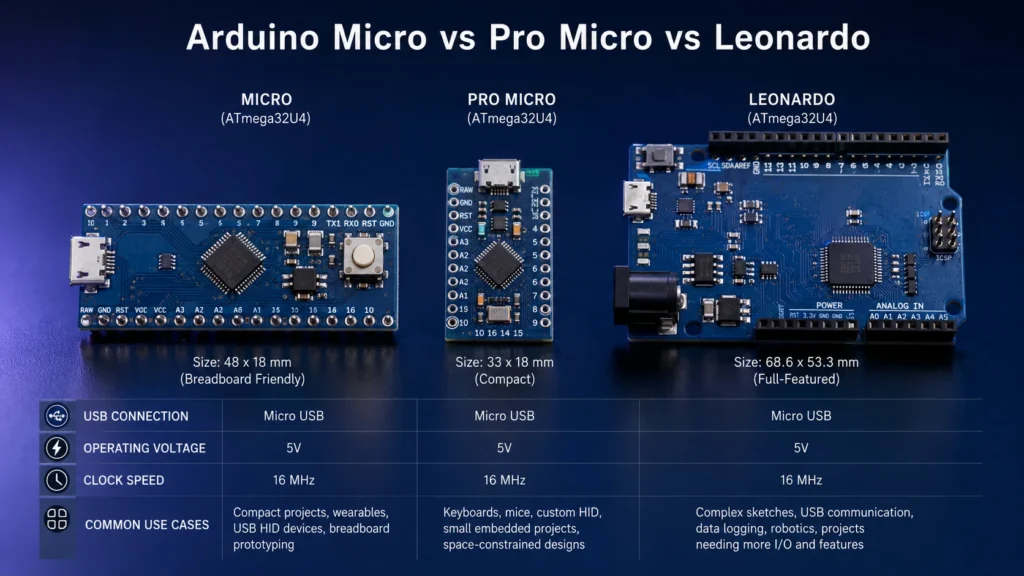
However, the phrase “Pro Micro pinout” can be misleading because not every Pro Micro-compatible board is identical. Some use 5V / 16MHz, some use 3.3V / 8MHz, and some label power pins as RAW and VCC instead of following the same naming style you may expect from an official Arduino board. That is why the safest way to understand a Pro Micro pinout is to first understand the underlying ATmega32U4, then compare it with the official Arduino Micro reference model.
Does Arduino Micro Use the Same ATmega32U4 Pinout?
Yes — but with an important distinction. The Arduino Micro and most Pro Micro boards use the same MCU family, yet they do not present the pins in exactly the same board format. At the microcontroller level, the ATmega32U4 is the same kind of device. At the board level, the pin labels, physical layout, breakout order, and power labeling can differ.
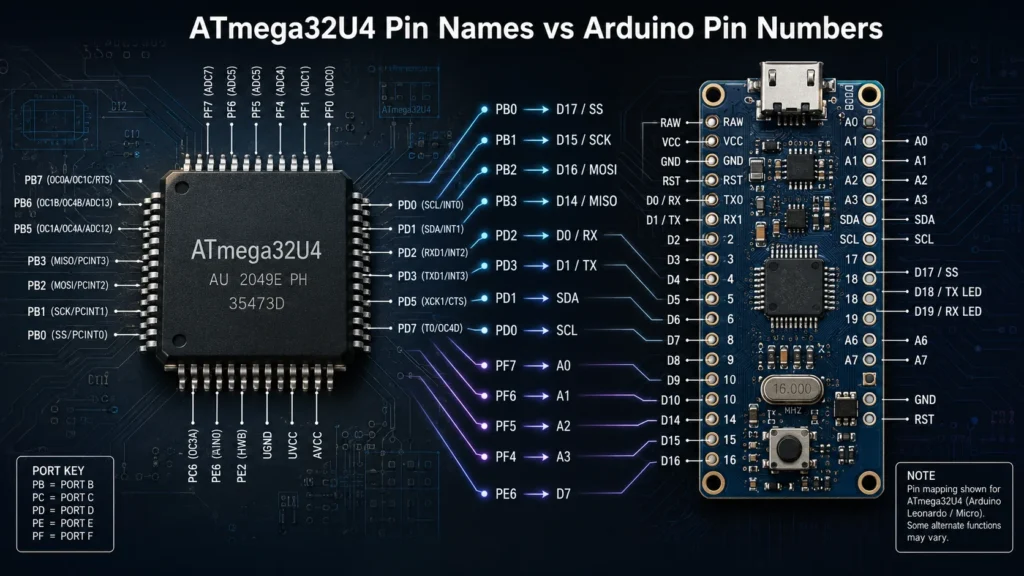
This is the same kind of distinction engineers deal with whenever they move between a chip datasheet and a development board. If you are new to that concept, our article on embedded systems vs microcontrollers helps explain why a microcontroller’s internal ports and a board’s user-facing pin names are related but not interchangeable. That distinction matters here because the ATmega32U4 datasheet may describe a function using port names such as PB0, PD2, or PE6, while an Arduino board diagram presents the same signal as D3, A0, SDA, or TX.
Arduino Pro Micro and Arduino Micro Pinout at a Glance
| Pin Group | Arduino Micro | Typical Pro Micro | What to Remember |
|---|---|---|---|
| Microcontroller | ATmega32U4 | ATmega32U4 | Same MCU family |
| USB | Native USB | Native USB | Excellent for HID-style projects |
| Digital I/O | 20 pins | Board-dependent breakout | Check clone-specific silk labels |
| PWM | 7 pins | Board-dependent labeling | Often quoted as 3, 5, 6, 9, 10, 11, 13 on official references |
| Analog Inputs | 12 inputs | Variant-dependent exposure | Some ADC functions share digital roles |
| UART | D0 / D1 | Usually RX / TX | Use Serial1 for hardware UART |
| I2C | SDA / SCL | Board-specific labels | Use board silk where available |
| SPI | ICSP header | Board-specific breakout | Do not assume Uno-style placement |
What Is the ATmega32U4 and Why Is It Used Here?
The ATmega32U4 is an 8-bit AVR microcontroller with integrated USB support. That single detail explains why it appears so often in compact Arduino-compatible boards. Unlike simpler platforms that need a separate USB-to-serial solution, ATmega32U4 boards can communicate directly over USB and can emulate devices such as keyboards, mice, and other HID-style peripherals.
That makes the chip especially attractive for projects that sit somewhere between learning, prototyping, and real embedded functionality. It is also one reason the ATmega32U4 remains an important part of the wider embedded processors and controllers category: it bridges hobby-friendly tools and practical system-level interfaces in a way that is still useful today.
If you are evaluating the broader MCU landscape rather than only Arduino boards, you may also want to compare how 8-bit MCUs differ from more modern ARM-based options in our guides to ARM microcontrollers, PIC microcontrollers, and FPGA vs microcontroller.
What Are the PWM, SPI, I2C, and UART Pins on the Arduino Micro?
This is the part most readers actually want, so it deserves a direct answer. On the official Arduino Micro reference, the board provides dedicated support for common communication and control interfaces. The hardware UART is associated with D0 and D1, I2C uses SDA and SCL, and SPI is best referenced from the ICSP header. PWM is typically available on the commonly cited set of pins 3, 5, 6, 9, 10, 11, and 13.
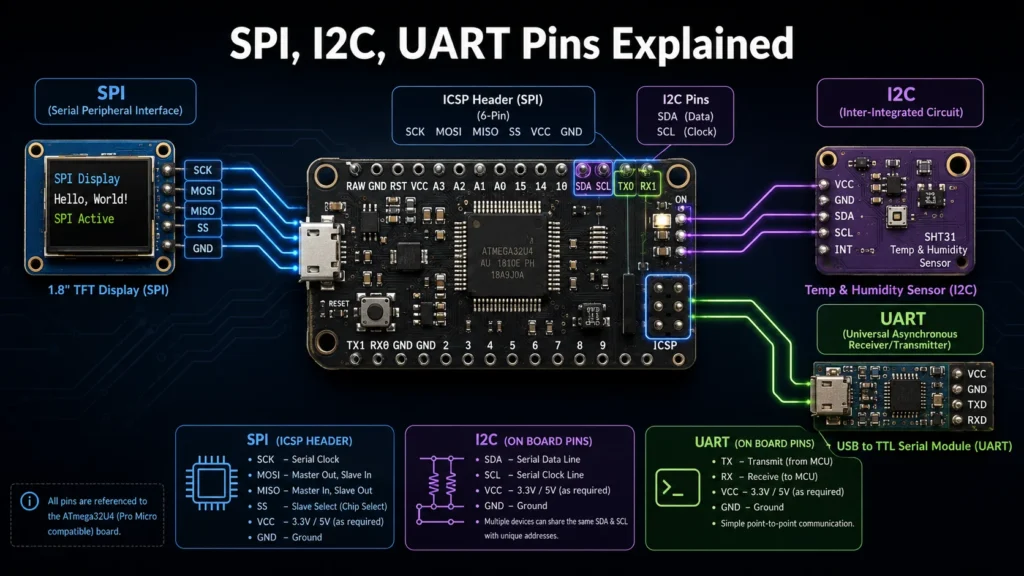
That answer is simple enough for quick lookup, but the real practical value comes from understanding what those groups are for. PWM pins are commonly used for LED dimming, audible tone generation, and simple motor control. UART is used for TTL serial communication between the board and external modules. I2C is popular for sensors, displays, EEPROMs, and expanders. SPI is often used for faster peripherals such as displays, storage, and radio modules.
Where Is SPI on the Arduino Micro and Pro Micro?
SPI is one of the most common sources of confusion in ATmega32U4 tutorials. Many users learned Arduino through Uno diagrams, so they expect SPI to show up in the same familiar way on every board. That assumption causes mistakes when moving to the Arduino Micro or a Pro Micro clone. On the official 32U4 Arduino board family, the safest reference for SPI is the ICSP header.
This matters when connecting SD card modules, OLED or TFT displays, radio transceivers, or external flash devices. If you are building a motion or actuator project, you may find this especially relevant alongside signal-driving hardware such as the ULN2003 stepper motor driver board, where the control logic is simple but your board-level pin assumptions still need to be correct.
On a Pro Micro, SPI may still be available, but the breakout presentation can vary. That is why a generic “Pro Micro pin diagram” found on an image search should never override the vendor’s actual board image or documentation.
What Are the PWM Pins on the Arduino Micro?
On the official Arduino Micro pinout references, the commonly cited PWM-capable pins are 3, 5, 6, 9, 10, 11, and 13. These pins are useful when you need analog-like control from a digital MCU, such as LED brightness adjustment, duty-cycle control, low-complexity actuation, or simple feedback generation.
For many readers, PWM is the first place where a small MCU board starts to feel like a real control platform instead of just a toy. That is also why microcontrollers remain central in practical embedded design: they combine sensing, timing, serial interfaces, and digital outputs in a single compact device. If you want a broader architectural comparison, see Embedded Systems vs Microcontrollers for the system-level perspective.
How Many Analog Pins Does the Arduino Micro Have?
The official Arduino Micro is generally referenced as having 12 analog inputs. These are typically labeled A0 through A11. That is one reason the board remains useful for sensor-heavy prototypes, educational instrumentation, human-interface builds, and compact mixed-signal projects.
Some of those analog-capable lines also overlap with digital functionality. That shared-function design is common in microcontrollers and helps maximize flexibility within a limited package. In real projects, that means you should not only ask, “How many analog pins are there?” but also, “Which other functions do I lose if I use that pin for ADC input?”
What Is the Difference Between Arduino Micro and Pro Micro?
The shortest answer is this: Arduino Micro is the official Arduino implementation of an ATmega32U4 board, while Pro Micro usually means a compact third-party ATmega32U4 board intended for tighter embedded builds. The MCU family is the same, but the board presentation is different.
| Feature | Arduino Micro | Pro Micro | Why It Matters |
|---|---|---|---|
| Board Source | Official Arduino board | Usually third-party or SparkFun-style | Documentation consistency differs |
| Form Factor | Compact official layout | Smaller embedded-oriented layout | Better for custom compact builds |
| Voltage / Clock | Commonly 5V / 16MHz | Often 5V / 16MHz or 3.3V / 8MHz | IDE settings and peripherals must match |
| Power Labeling | Arduino-style conventions | May use RAW / VCC or clone-specific names | Reduces wiring mistakes when verified |
| Best Use | Official reference and prototyping | Custom keyboards, macro pads, compact devices | Choose based on form factor and workflow |
If your project is still in the “learn, compare, prototype” phase, the official board is often easier to document and debug. If your project is already moving toward a smaller enclosure or custom USB interaction, the Pro Micro form factor is often more practical. For teams that eventually need a bigger performance jump, our comparisons in STM32 vs Arduino and Best Arduino Alternatives help map the upgrade path.
Why Is the ATmega32U4 Popular for USB HID Projects?
The ATmega32U4 stays relevant because it solves a very specific problem elegantly: it lets a small, low-power board behave like a real USB device. That is why it appears so often in macro pads, small keyboards, hotkey panels, custom control surfaces, USB measurement tools, and educational USB projects.
For many users, the real appeal is not just that it “has USB,” but that it reduces the mental and hardware distance between an embedded board and a direct computer interface. You do not need a physically larger board just to access keyboard-like or mouse-like behavior. That is a major reason the Pro Micro became so popular among builders who wanted more than a simple serial demo board.
Most Asked Questions About the Arduino Pro Micro Pinout
Does the Pro Micro use the ATmega32U4?
Yes. Most Pro Micro boards are built around the ATmega32U4, which is the same MCU family used in the Arduino Micro and Leonardo.
What are the PWM pins on the Arduino Micro?
On official Arduino references, the commonly cited PWM pins are 3, 5, 6, 9, 10, 11, and 13.
Where are the SPI pins?
On the Arduino Micro and Leonardo family, SPI is best referenced from the ICSP header rather than assumed from Uno-style board memory.
Can the Pro Micro work as a USB keyboard?
Yes. That is one of the most common uses of ATmega32U4-based Pro Micro boards.
What Is the Biggest Pinout Mistake People Make?
The single biggest mistake is treating the ATmega32U4 pinout, the Arduino Micro pinout, and the Pro Micro silk labels as if they were the same diagram. They describe the same hardware family from different perspectives, but they are not interchangeable.
The second biggest mistake is carrying over assumptions from the Uno, especially for SPI and USB behavior. A third common issue is forgetting that Serial and Serial1 are not the same thing on native USB 32U4 boards. Once you understand those three points, most of the confusion around the Arduino Pro Micro pinout disappears.
Power Pins, Regulators, and Practical Design Notes
Even though most readers focus on communication pins first, power design is often where projects actually fail. When working with an Arduino Micro or Pro Micro, always verify whether you are powering the board from USB, a regulated rail, or an external input pin. On Pro Micro-style boards, names like RAW and VCC can appear instead of the labels some users expect from official Arduino documentation.
If your project needs a simple regulated 5V rail for supporting logic or peripheral modules, it can be useful to review common regulator parts such as the L7805CV or AMS1117-5.0. These are not drop-in answers for every design, but they illustrate the kind of support components that often sit around microcontroller boards in practical embedded systems.
When Does Arduino Still Make Sense Today?
Arduino still makes a great deal of sense when your goals are clarity, fast prototyping, ecosystem familiarity, and educational momentum. That is especially true when the project benefits from a board that can talk to a computer directly over USB and possibly impersonate a human interface device. In that space, the ATmega32U4 remains surprisingly effective.
At the same time, it is fair to say that some projects eventually outgrow Arduino-class boards and move toward ESP32, STM32, RP2040, or other platforms. That is not a weakness of the Arduino Micro or Pro Micro. It just reflects a normal design progression. If you are already thinking beyond simple prototype scope, the natural next reads are Arduino vs ESP32, STM32 vs Arduino, and Best Arduino Alternatives.
Final Answer: How Should You Read the Arduino Pro Micro Pinout?
The best way to read the Arduino Pro Micro pinout is to think in layers:
- Layer 1: understand the ATmega32U4 as the actual microcontroller.
- Layer 2: use the Arduino Micro as the cleanest official reference model for board-level functions.
- Layer 3: verify the exact Pro Micro board revision or clone layout before wiring.
If you do that, the most important functional groups become easy to remember: UART on D0/D1, I2C on SDA/SCL, SPI via the ICSP header on official references, PWM on the commonly cited 3, 5, 6, 9, 10, 11, 13 set, and 12 analog inputs on the Arduino Micro reference model. That combination is exactly why the ATmega32U4 still occupies a useful place in compact USB-capable embedded design.
FAQ
Is Arduino Micro the same as Pro Micro?
No. Arduino Micro is an official Arduino board, while Pro Micro usually refers to a smaller third-party ATmega32U4 board. They are related, but the board layout, pin labels, and power naming may differ.
Does Arduino Micro use the ATmega32U4?
Yes. The Arduino Micro is based on the ATmega32U4 microcontroller and is one of the best-known official boards built around it.
What are the I2C pins on the Arduino Micro?
The I2C pins are SDA and SCL. Use those labels directly on the board or official pin reference when wiring I2C peripherals.
Where is SPI on the Arduino Micro?
On the official Arduino Micro and Leonardo family, SPI is best referenced from the ICSP header.
What are the PWM pins on the Arduino Micro?
Official Arduino references commonly cite pins 3, 5, 6, 9, 10, 11, and 13 as PWM-capable.
Can a Pro Micro act as a keyboard or mouse?
Yes. Because the ATmega32U4 has native USB support, Pro Micro boards are widely used for keyboards, macro pads, and other HID-style USB devices.
What is the difference between Serial and Serial1 on ATmega32U4 boards?
On ATmega32U4 boards, Serial usually refers to the native USB serial connection, while Serial1 refers to the hardware UART on the RX and TX pins.
Why does my Pro Micro fail to upload sometimes?
Typical causes include using the wrong board definition, selecting the wrong voltage/clock version, or following a clone-specific board layout that differs from the example you are using.
Need Help Sourcing Microcontrollers or Embedded Support Parts?
If you are selecting microcontrollers, voltage regulators, interface ICs, connectors, or embedded support components for your next design, MOZ Electronics can help with sourcing support and fast quote response.