When people search for faster home internet, they often compare modem plans, routers, and Wi-Fi systems first. But the physical connection still matters. In many homes, the real bottleneck is not the ISP package. It is the cable type, the shielding quality, the splitter condition, or the lack of a stable wired connection in the room where speed is needed most.
If you are deciding between RG6, RG11, and older coax options, or trying to understand whether an Ethernet adapter can help you use existing coax outlets for wired networking, this guide gives you a practical answer. For most residential broadband installations, RG6 is the best coaxial cable for high-speed internet. For very long runs, RG11 can reduce signal loss. And if your home already has coax in multiple rooms but not Ethernet, a MoCA Ethernet adapter can often turn that wiring into a stable wired network path.
What Are Coaxial Cables and Ethernet Adapters?
A coaxial cable is a shielded cable designed to carry radio-frequency signals. It uses a central conductor, insulation, metallic shielding, and an outer jacket. In home internet environments, coax is commonly used between the ISP network, wall outlets, splitters, and the modem or gateway.If you want a broader overview of connector formats used in coax assemblies, see our BNC connector guide.
An Ethernet adapter, in the context of a coax-based home network, usually refers to a MoCA Ethernet adapter. This device connects to your router by Ethernet and to your existing coax network, allowing another room with a coax outlet to receive a wired Ethernet connection without running new network cable through walls. MoCA Alliance states that MoCA 2.5 can deliver up to 2.5 Gbps MAC throughput with low latency over existing coax wiring, while Verizon describes its MoCA Ethernet adapter as a way to use existing coax outlets for reliable wired Ethernet in rooms far from the router.
Why This Topic Matters for High-Speed Internet
Many users assume that all coaxial cables are the same. They are not. Cable type, shielding, distance, connector quality, and splitter condition all affect signal integrity. At the same time, many homes were wired with coax years before Ethernet drops became common in every room. That creates a very common problem: you may have a fast internet plan, but the best connection point is in a room that only has a coax wall jack.
That is why this topic has strong search demand. People are really asking several questions at once:
- Which coaxial cable is best for a modem?
- Is RG6 better than RG59 for internet?
- When should I use RG11?
- Can I use a coax outlet to get Ethernet in another room?
- Do I need a MoCA adapter or new Ethernet cable?
Best Coaxial Cable for High-Speed Internet
For most residential broadband setups, the best choice is RG6 coaxial cable. This is the standard recommendation because RG6 offers the right combination of shielding, bandwidth handling, and practical flexibility for indoor installations. The material you provided also points to RG6 as the preferred option for modern high-speed internet, especially when paired with 75 Ohm impedance and better shielding quality.
In many cases, quad-shield RG6 is the safer recommendation when interference is a concern. Better shielding helps reduce the effect of nearby electrical noise and can support cleaner broadband signal delivery. That does not mean every home must use quad-shield cable, but it is often the smarter choice when signal quality matters more than small cost savings.
Why RG6 Is the Default Recommendation
- Better shielding than older RG59
- Lower signal loss for broadband use
- Suitable for high-frequency signals used by cable internet and digital TV
- Widely available and easy to install indoors
- Compatible with standard home 75 Ohm applications
When RG11 Makes More Sense
RG11 is typically recommended when the cable run is very long. It has lower signal loss than RG6, but it is thicker, stiffer, and less convenient for normal indoor routing. That means it is often the better engineering choice for long distances, but not the easiest choice for everyday in-home installation. Your source material highlights this same decision point: for runs over about 100 feet, RG11 can outperform RG6, but it is less common indoors. :contentReference[oaicite:4]{index=4}
Why RG59 Is Usually the Wrong Choice Today
RG59 is an older, thinner coax type with weaker shielding and higher signal loss. It may still appear in legacy installations, but it is generally not the right answer for modern broadband. If the goal is stable, high-speed internet, replacing old RG59 segments with RG6 is usually a smarter upgrade path. Your provided notes also clearly state that RG59 is not suitable for modern high-speed internet. :contentReference[oaicite:5]{index=5}
RG6 vs RG11 vs RG59
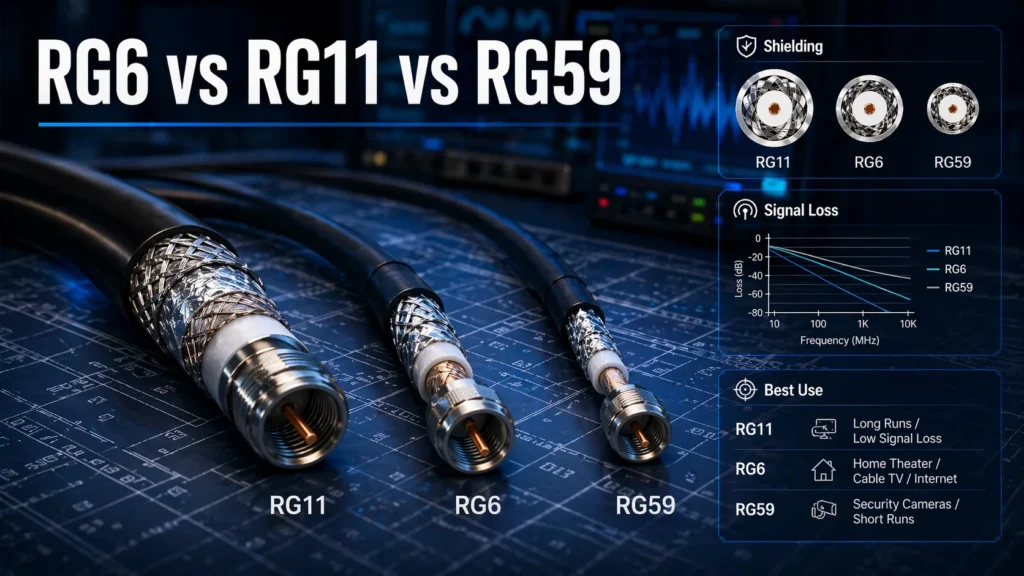
| Cable Type | Best Use Case | Main Advantage | Main Limitation |
|---|---|---|---|
| RG6 | Most home internet and TV setups | Balanced performance, shielding, and flexibility | Higher loss than RG11 on very long runs |
| RG6 Quad-Shield | Noisier environments, higher signal quality needs | Better interference protection | Slightly bulkier and usually costs more |
| RG11 | Long runs from entry point to modem or distribution area | Lower signal loss over distance | Thicker, stiffer, harder to route indoors |
| RG59 | Legacy or limited older installations | Smaller and more flexible | Weaker shielding and poorer broadband performance |
Why 75 Ohm Matters in Home Internet Installations
For cable internet and television systems, 75 Ohm impedance is the standard requirement. Matching the cable and system impedance matters because it helps maintain signal integrity and reduces avoidable mismatch issues. Your source content explicitly identifies 75 Ohm as the correct impedance for home internet and TV setups.
This is one of the easiest mistakes for non-technical buyers to make. They may search for a coax cable by length or connector style but ignore impedance. For consumer broadband and TV applications, that is the wrong buying logic. Cable type, shielding, and impedance all matter together.
What Is a MoCA Ethernet Adapter?
A MoCA Ethernet adapter uses existing coaxial wiring to carry network traffic between locations in the home. Instead of pulling new Ethernet cable through finished walls, you connect one adapter near the router and another at the destination room. The adapters bridge Ethernet networking over the coax path.
MoCA Alliance describes MoCA Home 2.5 as delivering up to 2.5 Gbps MAC throughput with low average latency and specifically positions it for Wi-Fi backhaul and home networking over existing coax. Verizon similarly explains that a MoCA Ethernet adapter can provide a dedicated wired connection from a functional coax outlet and may also allow TV service to share the same location through a splitter.
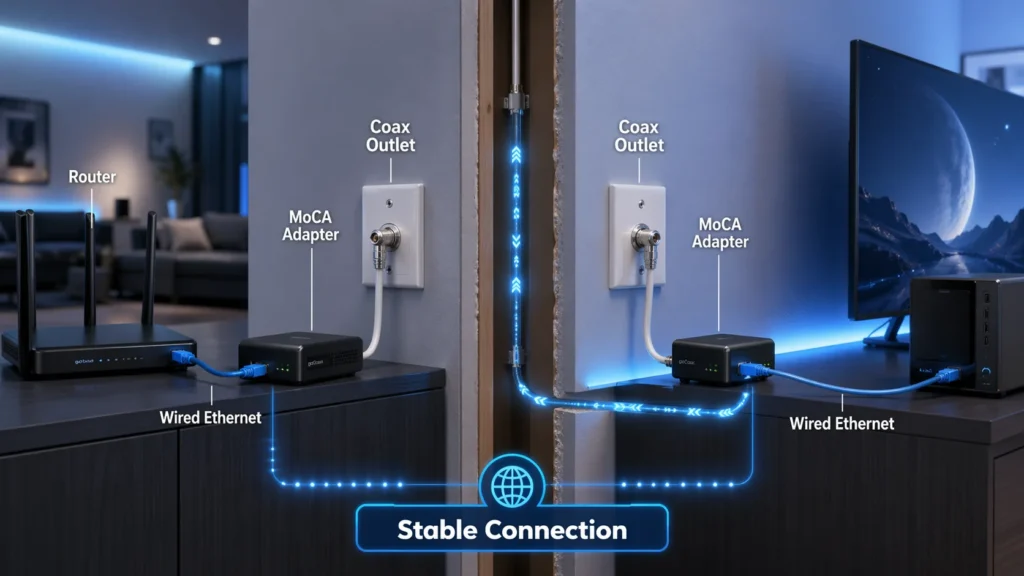
What a MoCA Adapter Is Good For
- Home office rooms without Ethernet cabling
- Gaming setups that need more stability than Wi-Fi
- Smart TVs and streaming boxes far from the router
- Wi-Fi backhaul improvement in larger homes
- Making use of existing coax infrastructure already in the walls
When You May Need One Adapter or Two
In a typical setup, you often use one adapter near the router and another where you want Ethernet. However, if the gateway or router already supports MoCA, you may need only one adapter at the remote location. Verizon notes that the existing router or home coax network determines the MoCA protocol in use, and that MoCA adapters can be backward compatible across earlier versions.
Coaxial Cable vs Ethernet Cable
Coaxial cable and Ethernet cable are not interchangeable, but they can work together in the same network design. Coax is commonly used to bring broadband service into the home and distribute signals through coax outlets. Ethernet cable is designed for local data networking between routers, switches, computers, access points, and other IP devices.
| Category | Coaxial Cable | Ethernet Cable |
|---|---|---|
| Main Use | Broadband, TV, RF signal transport | Local area network connections |
| Typical Home Role | ISP feed, wall outlets, modem connection | Router to device, switch, access point, or extender |
| Common Connectors | F-type | RJ45 |
| Upgrade Path | Better cable type, shielding, MoCA integration | Higher cable category, direct wired networking |
| Best Use in Existing Coax Homes | Carry broadband and support MoCA | Deliver device-level wired networking from router or MoCA adapter |
The practical answer is simple: if your room already has Ethernet, use Ethernet. If it only has coax and you need wired network stability, a MoCA adapter can often bridge the gap without major renovation.
When a MoCA Ethernet Adapter Is Better Than Running New Ethernet
Running fresh Ethernet cable is often the ideal technical solution, but it is not always the practical one. In apartments, finished homes, rented properties, and multi-story layouts, opening walls or fishing new cable may be expensive or impossible. In those cases, MoCA becomes attractive because it uses the wiring that is already there.
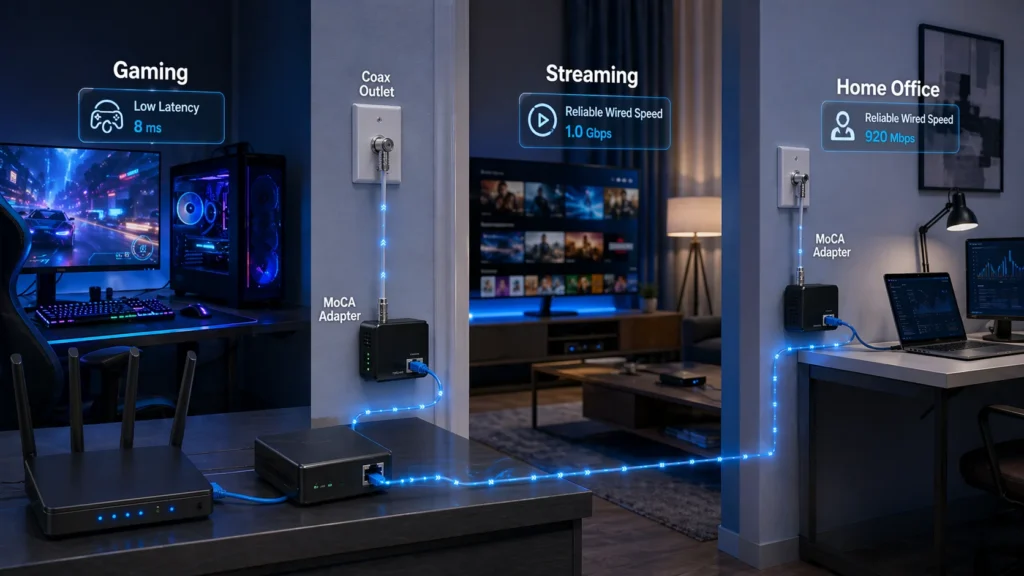
MoCA is especially useful when:
- You have coax wall jacks in several rooms
- Your Wi-Fi signal is weak or inconsistent in the target room
- You want lower latency for gaming or video calls
- You need a more reliable backhaul than wireless mesh alone
- You want a faster improvement path without construction work
How to Choose the Right Coaxial Cable and Ethernet Adapter
1. Start With the Real Goal
Are you replacing an old modem cable, extending a long coax run, or trying to create a wired network connection from a room that only has a coax outlet? The right product depends on the problem you are solving.
2. Choose the Correct Coax Type
For most homes, choose RG6. For longer distances where signal loss becomes a real concern, consider RG11. Avoid buying RG59 for a modern broadband upgrade unless you are dealing with a very specific legacy situation.
3. Confirm 75 Ohm Impedance
Do not skip this. If the cable is for home internet or television use, it should match the common 75 Ohm requirement.
4. Check Shielding Quality
Quad-shield RG6 can be a better option when interference, cable routing complexity, or signal reliability concerns justify the extra protection.
5. Review Splitters and Connectors
Sometimes the cable is not the main problem. Verizon’s guidance notes that faulty or outdated splitters and poor coax connections can also restrict performance.
6. Match the Adapter to the Network
If you are using a MoCA Ethernet adapter, check MoCA version support, Ethernet port speed, and whether your router or gateway already has built-in MoCA capability.
Common Mistakes to Avoid
- Buying RG59 for a new broadband setup: It is usually the wrong cable for modern speed expectations.
- Ignoring impedance: For home cable internet and TV, 75 Ohm is the standard choice.
- Using cheap or outdated splitters: These can reduce performance even if the cable itself is good.
- Assuming all Ethernet adapters are the same: For coax-based home networking, what you often need is specifically a MoCA adapter.
- Overlooking run length: RG6 is ideal for most homes, but long runs may justify RG11.
Best Choice by Scenario
| Scenario | Best Recommendation | Why |
|---|---|---|
| Standard home cable internet | RG6 | Best overall balance for broadband performance and installation |
| Higher interference environment | Quad-shield RG6 | Better protection against signal contamination |
| Very long coax run | RG11 | Lower signal loss over distance |
| Room has coax but no Ethernet | MoCA Ethernet adapter | Turns existing coax path into a wired network link |
| Old home with RG59 installed | Upgrade key segments to RG6 | Improves suitability for modern broadband use |
Buying Checklist
- Choose RG6 for most home internet installations
- Choose RG11 only when long runs justify the tradeoff
- Confirm 75 Ohm impedance
- Consider quad-shield for more demanding environments
- Check the quality of F-type connectors
- Inspect or replace old splitters if speeds are inconsistent
- Use a MoCA Ethernet adapter when you need wired internet from a coax outlet
- Verify whether your router already supports MoCA
Final Verdict
If you want the shortest practical answer, it is this: RG6 is the best coaxial cable for most high-speed internet installations. If the run is unusually long, RG11 can reduce loss. If your home has coax outlets but no Ethernet where you need it, a MoCA Ethernet adapter is often the smartest upgrade because it gives you a wired-style connection without the cost and disruption of pulling new cable.
That combination of decisions is what solves the real user problem. Good internet performance is not only about the ISP plan. It is about choosing the right cable, the right shielding, the right distance strategy, and the right way to extend wired networking through the home.
Need Help Choosing Connectivity Components?
If you are sourcing coaxial cable, connectors, adapters, or other electronic components for broadband, networking, or integration projects, contact our team for product support and availability guidance.
FAQs
What is the best coaxial cable for high-speed internet?
For most homes, the best choice is 75 Ohm RG6. Quad-shield RG6 is a stronger option when interference protection matters more.
Is RG6 better than RG59 for internet?
Yes. RG6 has better shielding and lower signal loss, which makes it more suitable for modern broadband. RG59 is generally considered outdated for high-speed residential internet.
When should I use RG11 instead of RG6?
Use RG11 when the cable run is long enough that signal loss becomes a real concern. It performs better over distance, but it is thicker and harder to install indoors.
Can I convert coaxial cable to Ethernet?
You cannot do it with a passive cable swap, but you can use MoCA Ethernet adapters to carry network traffic over existing coax wiring and create wired Ethernet access in another room.
Do I need one or two MoCA Ethernet adapters?
In many setups, you use one adapter near the router and another in the destination room. If your router or gateway already supports MoCA, you may only need one adapter at the remote end.
Is coaxial cable faster than Wi-Fi?
Coax itself is not a direct replacement for Wi-Fi, but a MoCA-based coax network can provide a more stable, lower-latency backhaul or wired connection than relying on wireless alone in many homes.