Circuit board components are the electronic parts mounted on a printed circuit board (PCB), such as resistors, capacitors, inductors, diodes, transistors, integrated circuits, connectors, fuses, relays, crystals, LEDs, and sensors. The PCB itself provides the physical structure and copper pathways, while the components perform the electrical functions of the circuit.
PCB components are not the same as PCB materials. Components perform electrical functions, while the board substrate, copper, solder mask, and silkscreen support and connect them.
The fastest way to identify circuit board components is to read the silkscreen reference designator, check the package style, look for value markings, and cross-check with the BOM or schematic.
Common PCB labels include R for resistor, C for capacitor, D for diode, Q for transistor, U for integrated circuit, and J for connector.
Circuit board components are the parts that make an electronic device actually work. A board without components is only a base with copper connections. Once you add resistors, capacitors, transistors, ICs, connectors, and protection parts, the PCB becomes a functional circuit.
For beginners, technicians, students, and component buyers, learning circuit board components identification is one of the most practical electronics skills. It helps with troubleshooting, replacement, sourcing, reverse engineering, and understanding how a board is designed.
This guide explains the most common printed circuit board components, what they do, how they look, what their labels mean, and how to identify them with more confidence in real-world situations.
What Are Circuit Board Components?
Circuit board components are the electronic parts mounted on a PCB that control, store, switch, protect, process, or transfer electrical energy and signals. These are the working elements of the board.
The most common components of a circuit board include:
- Resistors
- Capacitors
- Inductors
- Diodes
- Transistors
- Integrated circuits (ICs)
- Connectors
- Fuses
- Relays
- Crystals and oscillators
- LEDs
- Sensors
If you want to identify circuit board components correctly, the first step is understanding that the board and the components are different things. The board supports and connects. The components perform the function.
PCB Components vs. PCB Board Materials and Parts
This is where many beginners get confused. A PCB contains both electronic components and board-level materials or features, but they are not the same.
| Type | Examples | Main Role |
|---|---|---|
| PCB Components | Resistors, capacitors, diodes, transistors, ICs, connectors, relays, sensors | Perform electrical or electronic functions |
| PCB Board Materials / Parts | FR-4 substrate, copper traces, solder mask, silkscreen, pads, vias | Provide structure, routing, insulation, and manufacturability |
For example, the green solder mask on a PCB is not a circuit component. A via is not a circuit component. A resistor, voltage regulator, connector, or microcontroller is a circuit component.
PCB Structure Guide
Learn more about PCB-related tutorials, board terms, and electronics fundamentals.
Electronic Components Overview
Explore more guides about passive components, semiconductors, ICs, and related parts.
Main Categories of Circuit Board Electronic Components
Passive Components
Passive components do not amplify signals by themselves. The main examples are resistors, capacitors, and inductors. These are essential for current limiting, filtering, decoupling, energy storage, and timing support.
Active Components
Active components can switch, regulate, amplify, or process electrical signals. This group includes diodes, transistors, integrated circuits, LEDs, and many sensor devices.
Electromechanical Components
Electromechanical parts combine electrical and physical behavior. Common examples include relays, switches, terminal blocks, and many connectors.
Timing and Frequency Components
Crystals and oscillators provide stable clock signals for digital electronics such as microcontrollers, processors, communication modules, and timing circuits.
Common Circuit Board Components and Their Functions
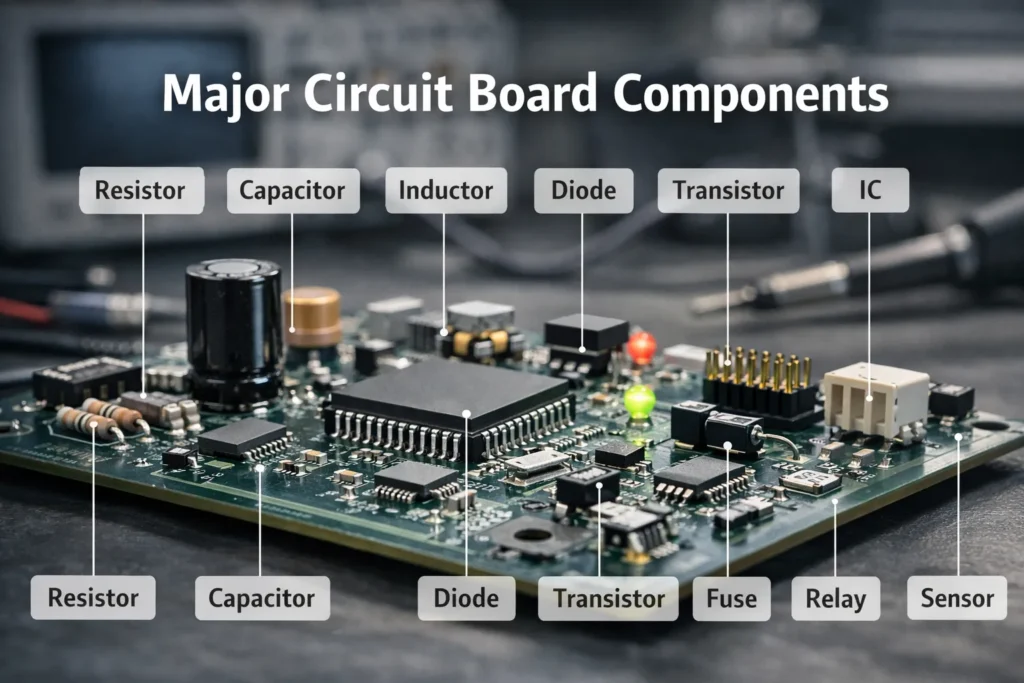
Resistors
What they do: Resistors limit current, divide voltage, set signal levels, and control bias conditions inside a circuit.
How they look: Through-hole resistors are usually cylindrical with color bands. SMD resistors are small rectangular chips, often dark with a printed numeric code on larger package sizes.
Common PCB label: R such as R1, R12, or R205.
Typical applications: LED current limiting, pull-up and pull-down networks, voltage dividers, analog biasing, and signal termination.
Common examples: 1 kΩ, 4.7 kΩ, and 10 kΩ resistors are among the most common values found on control and interface boards. Brands such as Vishay are widely used in production electronics.
Capacitors
What they do: Capacitors store charge and help stabilize voltage, reduce noise, couple AC signals, and support timing functions.
How they look: Ceramic capacitors are often small beige or brown SMD blocks with no visible marking. Electrolytic capacitors are usually cylindrical and marked with capacitance, voltage, and polarity.
Common PCB label: C such as C1, C8, or C47.
Typical applications: Power rail filtering, decoupling, signal coupling, transient suppression, and timing support.
Common examples: 0.1 µF MLCC capacitors are standard around IC power pins, while 10 µF to 100 µF electrolytics are often used in power supply sections. For capacitor sourcing and MLCC examples, passive components are a useful starting point, while TDK is one of the best-known suppliers in this category.
Inductors
What they do: Inductors store energy in a magnetic field and resist sudden changes in current.
How they look: Inductors may appear as molded SMD blocks, shielded power cubes, ferrite parts, or visible wound coils.
Common PCB label: L such as L1 or L3.
Typical applications: DC-DC converters, EMI filters, RF networks, and power regulation circuits.
Diodes
What they do: Diodes allow current to flow mainly in one direction. They are used for rectification, reverse-polarity protection, signal routing, and surge suppression.
How they look: Many diodes have a polarity band at one end. SMD diodes are small rectangular packages with one marked side.
Common PCB label: D such as D1, D4, or D12.
Typical applications: Input protection, rectifier stages, flyback suppression, ESD protection, and clipping circuits.
Common examples: 1N4148 signal diodes, 1N4007 rectifier diodes, and SMBJ-series TVS diodes are widely recognized examples.
Transistors
What they do: Transistors switch or amplify signals. They are widely used for load control, signal gain, and power management.
How they look: Small transistors often use TO-92 or SOT-23 packages. Larger power transistors and MOSFETs may use TO-220, DPAK, or similar heat-capable packages.
Common PCB label: Q such as Q1 or Q7.
Typical applications: Switching motors, driving relays, analog amplification, power conversion, and logic interfacing.
Common examples: 2N2222, BC547, and MOSFETs such as IRLZ44N are common reference parts in many designs. For broader sourcing by device family, transistors are frequently selected by package, current, voltage, and switching requirements.
Integrated Circuits (ICs)
What they do: Integrated circuits combine many electronic functions into one package. An IC can regulate power, process logic, amplify signals, store memory, or control an entire system.
How they look: ICs are usually black packages with multiple pins or pads, such as DIP, SOIC, QFP, QFN, or BGA.
Common PCB label: U such as U1, U3, or U10.
Typical applications: Microcontrollers, op-amps, regulators, memory chips, interface controllers, logic devices, and sensor processing.
Common examples: NE555 timers, LM358 op-amps, 74HC logic ICs, ATmega328P microcontrollers, and AMS1117 regulators are familiar examples. Common suppliers in this space include Texas Instruments, NXP, STMicroelectronics, and Microchip.
Connectors
What they do: Connectors provide the interface between the PCB and external wires, cables, modules, or other boards.
How they look: They may be pin headers, USB ports, terminal blocks, JST wire connectors, coaxial connectors, sockets, or board-to-board headers.
Common PCB label: J such as J1 or J4.
Typical applications: Power input, signal I/O, communication interfaces, display connection, and cable harness interfaces.
Common examples: TE Connectivity and other connector families are commonly found on commercial PCBs. For Ethernet and structured-cabling applications, this RJ45 connector selection guide is also useful.
Fuses
What they do: Fuses protect a circuit by opening when current rises above a safe limit.
How they look: They may be glass tube fuses, ceramic cartridge fuses, resettable polymer fuses, or compact SMD protection parts.
Common PCB label: F such as F1 or F2.
Typical applications: Power input protection, battery packs, USB power lines, and appliance safety circuits.
Relays
What they do: Relays are electrically controlled switches that let a low-power signal control a higher-power load.
How they look: Relays are usually larger rectangular components with plastic housings that stand out from smaller PCB parts.
Common PCB label: Usually K on many boards.
Typical applications: Appliance control, industrial outputs, automotive switching, and mains-powered load control.
Common examples: Omron and Songle relay families are commonly seen on controller boards and relay modules.
Crystals and Oscillators
What they do: These components generate stable timing or clock signals.
How they look: They are often metal-can packages or sealed SMD modules with compact rectangular or oval shapes.
Common PCB label: Y or X such as Y1 or X1.
Typical applications: Microcontrollers, communication devices, processors, and frequency control circuits.
LEDs
What they do: LEDs emit light and are used for visual indication, display backlighting, and optical communication.
How they look: They may be clear or colored through-hole lamps, or small surface-mount packages in white or translucent housings.
Common PCB label: Often D, and sometimes LED.
Typical applications: Status indication, front-panel display, lighting, and infrared signaling.
Sensors
What they do: Sensors detect environmental or physical conditions and convert them into electrical signals.
How they look: Sensor packages vary widely. Some resemble ICs, while others include exposed sensing elements, vents, lenses, or probes.
Common PCB label: This depends on the sensor type. Many sensor ICs use U, while thermistors may use RT.
Typical applications: Temperature sensing, motion detection, light measurement, pressure monitoring, current sensing, and environmental control.
Capacitor Guide
Learn capacitor basics, types, formulas, and common applications.
Connector Category
Browse connector and interconnect product families.
How to Identify Components on a Circuit Board
If your goal is circuit board components identification, the best method is to combine visual inspection with board documentation and simple test tools.
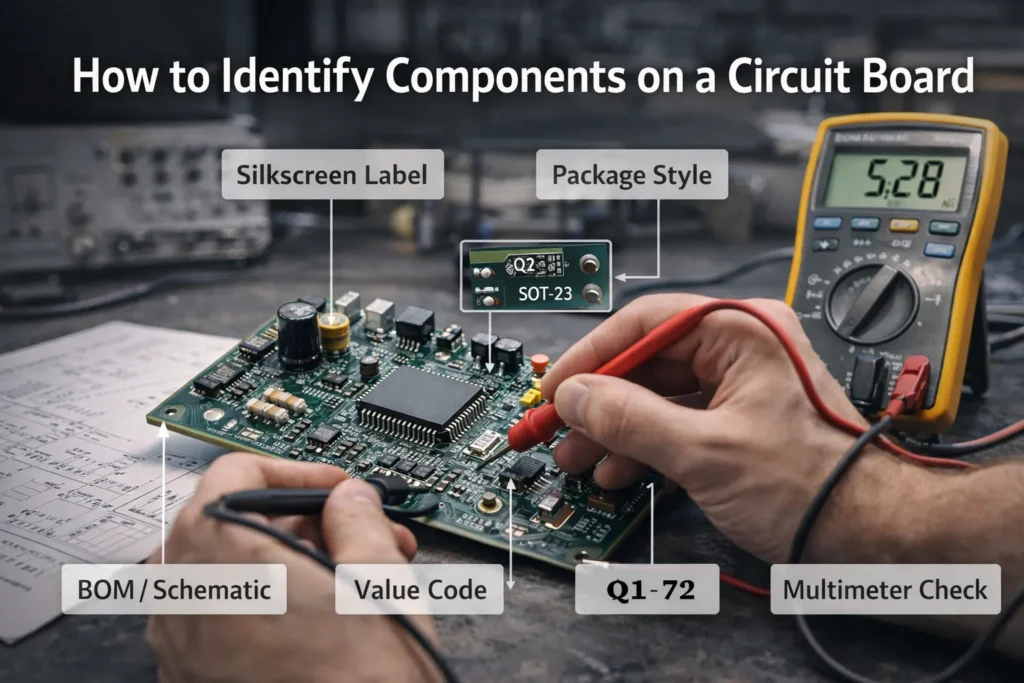
Read the Silkscreen Reference Designators
The silkscreen is the printed text on the PCB surface. It often marks the component type with a letter code and a number.
- R12 usually means resistor
- C5 usually means capacitor
- D3 usually means diode
- Q2 usually means transistor
- U1 usually means integrated circuit
- J4 usually means connector
This is one of the fastest ways to identify circuit board components.
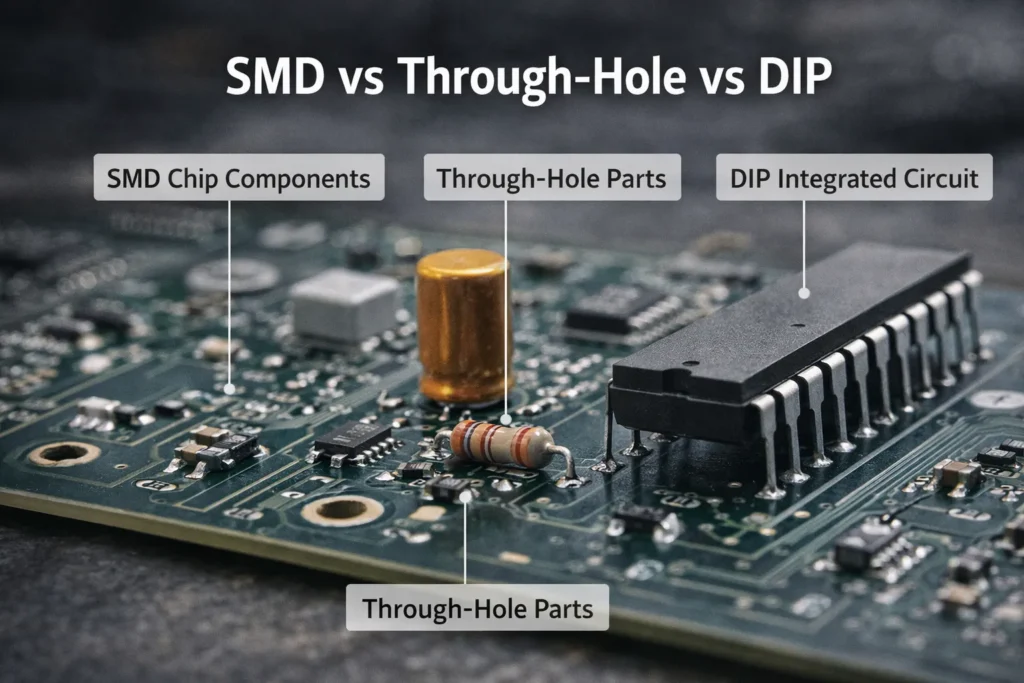
Check the Package Style
Package type gives strong clues about what the part might be.
SMD Packages
Surface-mount devices are soldered directly to PCB pads. They dominate modern consumer and industrial boards. Examples include chip resistors, MLCC capacitors, SOT-23 transistors, and QFN or SOIC ICs.
Through-Hole Packages
Through-hole parts have leads that pass through drilled holes in the PCB. These include many electrolytic capacitors, larger connectors, relays, terminal blocks, and older discrete components.
DIP Packages
DIP packages are through-hole integrated circuits with two rows of pins. They are still common in development boards, educational kits, legacy devices, and repair work.
Read Value Markings and Codes
Many parts include visible codes or numbers:
- SMD resistors often use 3-digit or 4-digit value codes
- Electrolytic capacitors usually show capacitance and voltage
- ICs usually include a part number or top mark
- Crystals often show operating frequency
- Diodes and transistors may use abbreviated package markings
Very small SMD parts often have no readable marking. In those cases, you need to rely on the designator, footprint, board context, or documentation.
Cross-Check with the Schematic or BOM
If the schematic or bill of materials is available, use it. A board designator such as U7 or C14 should match the same identifier in the BOM and circuit diagram. This is one of the most reliable methods for identifying circuit board components correctly.
Use Basic Tools Like a Multimeter
A multimeter helps confirm identity and condition. It is especially useful for troubleshooting and verifying unknown parts.
- Resistance mode helps measure resistors
- Continuity mode helps check fuses and traces
- Diode mode helps test diodes and LEDs
- Voltage mode helps confirm circuit behavior in operation
For unknown parts, the most reliable sequence is: silkscreen label → package style → value marking → circuit location → BOM or schematic → multimeter confirmation.
Circuit Board Component Labels Explained
Circuit board component labels are usually short reference designators printed on the PCB and repeated in the schematic. These codes make it easier to identify the type of component before reading the exact part number.
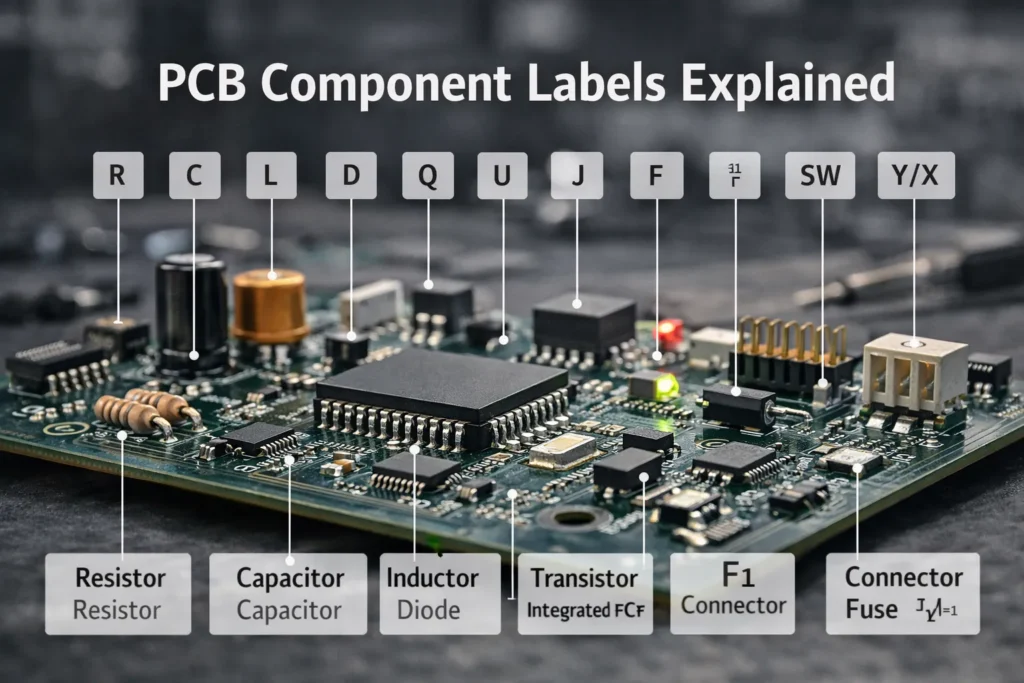
| Label | Meaning | Examples |
|---|---|---|
| R | Resistor | R1, R22 |
| C | Capacitor | C1, C45 |
| L | Inductor | L1, L2 |
| D | Diode / LED | D1, D8 |
| Q | Transistor | Q1, Q6 |
| U | Integrated Circuit | U1, U3 |
| J | Connector | J1, J5 |
| F | Fuse | F1, F2 |
| SW | Switch | SW1, SW2 |
| Y / X | Crystal / Oscillator | Y1, X1 |
You may also see K for relays, TP for test points, VR for variable resistors, and RT for thermistors.
How to Choose the Right Circuit Board Components
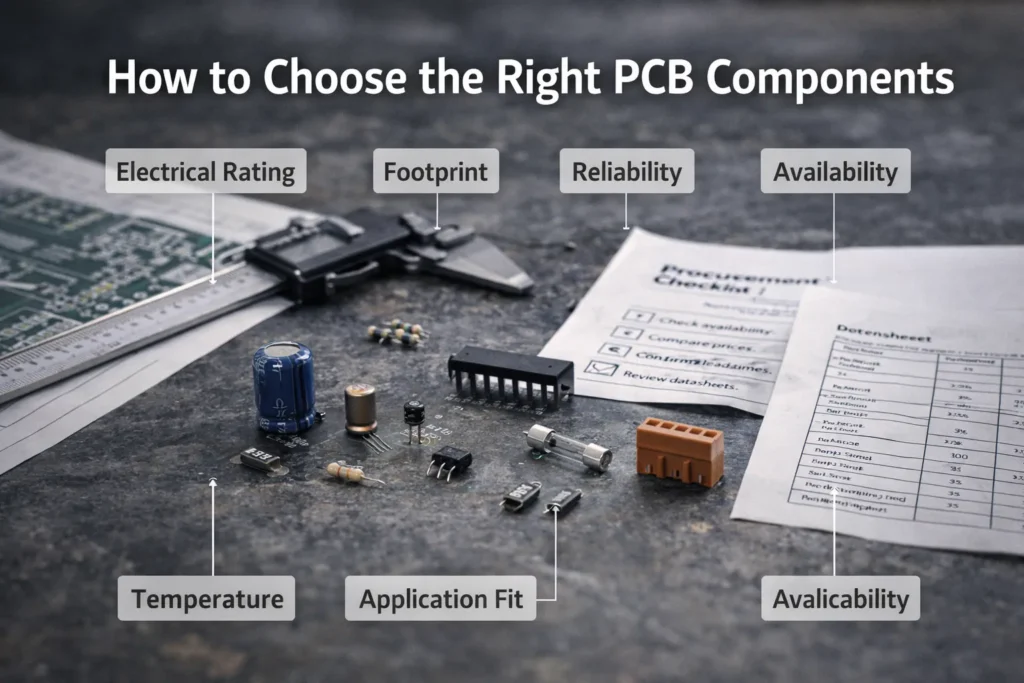
If you are sourcing or specifying parts, choosing the right component means more than selecting the same category. You need to confirm electrical compatibility, footprint, reliability, and supply stability.
Electrical Fit
Check voltage, current, power, resistance, capacitance, tolerance, frequency, and temperature rating.
Mechanical Fit
Make sure the package, footprint, height, and mounting style match the PCB design and enclosure needs.
Supply & Quality
Use reputable manufacturers, stable supply channels, and verified specifications for long-term reliability.
For production and purchasing teams, common brands often include Vishay, TDK, Texas Instruments, NXP, STMicroelectronics, Infineon, onsemi, and TE Connectivity. If you need help with discontinued or hard-to-source parts, obsolete electronic components sourcing can also be relevant. However, the best choice always depends on the exact application and board design.
Component Buying Guide
Explore sourcing support and electronic component supply options.
Transistor Learning Resources
Read more practical transistor tutorials and component guides.
Common Mistakes When Identifying PCB Components
Confusing Board Features with Components
Pads, vias, copper pours, and test points are not electronic components, even though they are essential parts of PCB construction.
Assuming Every Black SMD Package Is an IC
Many black packages are actually diodes, transistors, ferrite beads, or power inductors.
Ignoring Polarity and Orientation
Electrolytic capacitors, LEDs, diodes, connectors, and many semiconductors must be installed in the correct orientation.
Relying Only on Appearance
Different component types can look very similar. Visual shape alone is not enough for reliable identification.
Skipping the BOM or Schematic
If documentation exists, use it. A BOM or schematic can save time and prevent incorrect replacement choices.
FAQ: Circuit Board Components
Below are the questions users most often ask when learning about printed circuit board components, component labels, and board-level identification.
What are the main components of a circuit board?
The main components of a circuit board usually include resistors, capacitors, inductors, diodes, transistors, integrated circuits, connectors, fuses, relays, crystals, LEDs, and sensors.
What is the difference between a PCB and PCB components?
A PCB is the board itself, including the substrate, copper traces, solder mask, and silkscreen. PCB components are the electronic parts mounted on that board to perform electrical functions.
How can I identify circuit board components easily?
Start with the silkscreen reference designator, then check the package style, read any markings, compare with the schematic or BOM, and confirm with a multimeter if necessary.
What do R and C mean on a circuit board?
R means resistor and C means capacitor. These are standard PCB reference designators used on both circuit diagrams and board silkscreen.
Why do some PCB components have no markings?
Very small SMD components often have no readable value markings because the package is too small. In that case, use the PCB label, BOM, schematic, or measurement tools.
What does U mean on a PCB?
U usually means integrated circuit. It may refer to a microcontroller, regulator, op-amp, memory chip, logic device, or interface controller.
Are LEDs labeled as D or LED?
Many boards label LEDs as D because LEDs are diodes. Some designs use LED1, LED2, or similar naming for easier visual identification.
What is the best tool for identifying unknown PCB parts?
A multimeter is usually the most useful starting tool. For deeper analysis, technicians may also use LCR meters, microscopes, datasheets, and schematic or BOM references.
Final Thoughts
Learning how to identify circuit board components becomes much easier when you use a repeatable process instead of guessing. Start with the silkscreen label. Check the package style. Read the markings. Compare with the schematic or BOM. Then confirm with a multimeter when necessary.
That process is practical for beginners, technicians, students, repair teams, and component buyers. It also helps reduce mistakes when replacing parts, understanding a PCB, or sourcing alternatives.
The most effective way to identify PCB components is to combine reference designators, package style, value markings, documentation, and simple electrical testing. That gives much more reliable results than appearance alone.